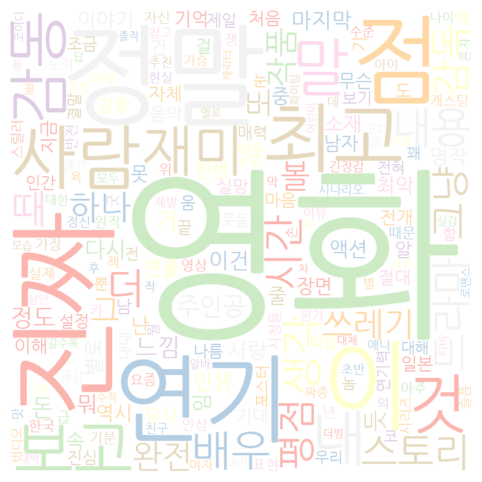
- 워드클라우드(WordCloud) : 문자(Text)를 시각화해서 보여주는 것!
- VOC (Voice of Customer)를 시각화해서 손쉽게 이해할 수 있다.
- 한글 워드클라우드(WordCloud)의 특수성을 이해하자.
❑ 예제 구글 드라이브 복사
❑관련 pip 설치
Python
!pip install konlpy
!apt-get -qq install fonts-nanumkonlpy → 영문이 아닌 한글을 처리하기 위한 library
❑Colab (구글 시트에서 데이터 가져오기)
Python
from google.colab import auth
auth.authenticate_user()

import gspread
from google.auth import default
creds, _ = default()

gc = gspread.authorize(creds)

# gc.open('구글시트이름- 왼쪽상단').worksheet("구글시트 탭이름 - 아래쪽 하단")
worksheet = gc.open('WordCloud').worksheet("Comments")

# get_all_values gives a list of rows.
df = worksheet.get_all_values()
print(df)

# Convert to a DataFrame and render.
import pandas as pd

df = pd.DataFrame.from_records(df)❑구글 시트에서 가져온 데이터 Columns 이름 설정 및 Header 설정
Python
new_header = df.iloc[0] #grab the first row for the header
df = df.iloc[1:] #take the data less the header row
df.columns = new_header #set the header row as the df header❑워드클라우드(WordCloud)
Python
import pandas as pd
from konlpy.tag import Okt
from collections import Counter
from wordcloud import WordCloud
import matplotlib.pyplot as plt
import matplotlib.font_manager as fm

okt = Okt()
# 불용어(stopwords) 제거 - 한글은 아직 수동으로 불용어를 제거 한다.
stopwords = ['만', '발', '좀', '수', '터', '제', '달', '칼', '요', '사려', '안', '소', '를', '개', '저', '왜', '나', '역', '퍼', '방', '트', '욥', '무']

# okt library 를 통해 한글 명사화 및 불용어 제거 (Stopwords)
nouns = []
for comment in df['Comments']:
   extracted_nouns = okt.nouns(comment)
   filtered_nouns = [noun for noun in extracted_nouns if noun not in stopwords]
   nouns.extend(filtered_nouns)

noun_counts = Counter(nouns)

# Wordcloud 에 사용할 한글 폰트 추가
font_path = '/usr/share/fonts/truetype/nanum/NanumMyeongjoBold.ttf'

wordcloud = WordCloud(font_path=font_path, background_color='white', colormap='Pastel1',
                     width=800, height=800, max_words=200)
wordcloud.generate_from_frequencies(noun_counts)

plt.figure(figsize=(10, 6))
plt.imshow(wordcloud, interpolation='bilinear')
plt.axis('off')
plt.show()한글 지원 폰트 (ttf_list)# 한글 지원 ‘/usr/share/fonts/truetype/nanum/NanumBarunGothic.ttf’ ‘/usr/share/fonts/truetype/nanum/NanumBarunGothicBold.ttf’ ‘/usr/share/fonts/truetype/nanum/NanumGothicBold.ttf’ ‘/usr/share/fonts/truetype/nanum/NanumSquareR.ttf’ ‘/usr/share/fonts/truetype/nanum/NanumMyeongjoBold.ttf’ ‘/usr/share/fonts/truetype/nanum/NanumGothic.ttf’ ‘/usr/share/fonts/truetype/nanum/NanumMyeongjo.ttf’ ‘/usr/share/fonts/truetype/nanum/NanumSquareRoundR.ttf’ ‘/usr/share/fonts/truetype/nanum/NanumGothicCoding.ttf’ ‘/usr/share/fonts/truetype/nanum/NanumSquareRoundB.ttf’
WordCloud for Python documentation — wordcloud 1.8.1 documentation
- Output 이미지
한글 워드클라우드 참고 할 수 있는 사이트